Asana Review on Irzby: Detailed Analysis and User Experiences
If you are trying to find a tool that helps in managing your projects with a clear overview, then Asana is one of the leading products which is designed to enhance team collaboration and boost productivity. In this article, we will explore everything you need to know about Asana's capabilities, usability, features, and pros and cons. We will also share the experiences of users to help you decide whether it is the tool you are searching for.
What is Asana and what is it used for?
Asana is a project management tool developed for improving team collaboration, tracking work progress, and enhancing productivity. It is perfect for the workers that are always on the move because it offers Android and iOS apps besides the web-based application. Asana is used by individuals, teams, and organizations globally to track their work, set priorities, communicate about tasks, and get a full picture of the progress against the planned goals.
How does Asana work?
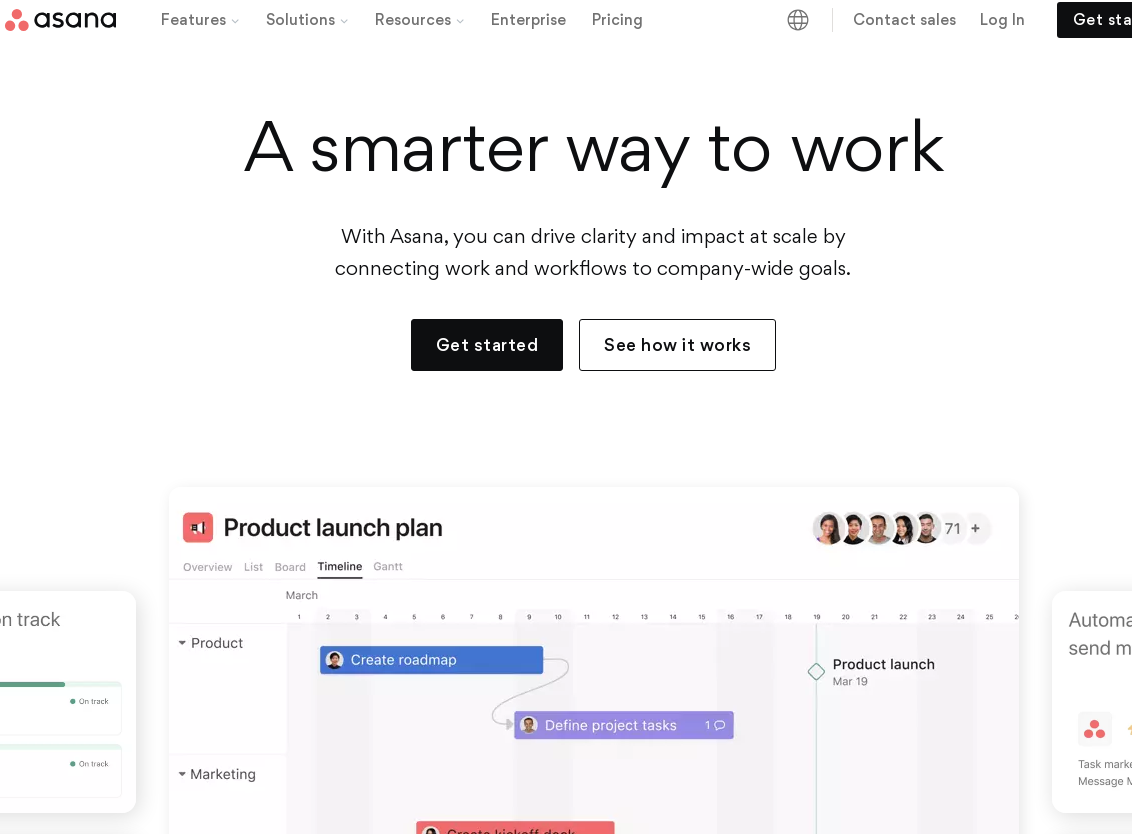
The core functionality of Asana rotates around "Projects" where all the tasks are listed. Every project can be visualized in different ways - as a list, a Kanban board, a timeline, or a calendar. Within the projects, teams can create tasks, assign them to a team member, add due dates, attach files, and write descriptions.
Main Features of Asana
Task Management
One of the fundamental structures of Asana is efficient task management. Users can create tasks, set due dates, delegate them to team members, and categorize them under different projects. You can also set priority levels for each task.
Intuitive Dashboard
Asana’s dashboard is clear, intuitive, and simple to operate. It quickly exhibits a panoramic view of all the projects and their respective progress.
Customizable Templates
Asana offers an array of customizable templates for different project types which streamlines project setup and improves team productivity.
Integration Capability
Asana supports integration with various other productivity tools such as Slack, Google Drive, Outlook, and Dropbox.
Automation
"To-do" list automation, project status update automation, and various other automations can be set up in Asana to help in managing repetitive tasks.
Conversation and File Sharing
Users can communicate directly on tasks, eliminating the requirement for endless email threads. File sharing is also made simple, including the ability to attach files directly from Google Drive or DropBox.
User Experiences
Users have laid considerable praise for Asana, particularly for its easy to use interface, robust functionality, and excellent customer support. Despite praising its simplicity and ease of use, some users felt that its mobile app lacks some vital features in comparison to the desktop version.
Pros and Cons of Asana
Like any tool, Asana has its strengths and weaknesses. Here are a few to consider:
Pros
- Clear and user-friendly interface
- Wide range of features and integrations
- Scalable for small to large organizations
- Excellent customer service
Cons
- Mobile app lacks some essential features
- Some users find it slightly expensive compared to other tools
- Can be overwhelming for new users with its extensive features
How to Get the Most Out of Asana?
To get the most out of Asana, learn to use its wide range of capabilities. Utilize the features like task dependencies, custom fields, and third-party integrations. Attend training webinars or tutorials offered by Asana, engage with communities, and learn from power users.
Weaknesses of Asana
Limited Customization Options
Asana offers a variety of project management features, but it falls short in terms of customization. Its layout and workflow structures are somewhat rigid, limiting the flexibility needed by teams with unique or evolving project management styles. This can be a significant drawback for organizations that require high levels of customization to align with their specific processes or methodologies.
In addition, the platform's aesthetic customization options are limited. Users cannot significantly personalize the interface, which can impact user experience and engagement, especially for teams accustomed to a more tailored workspace.
Suboptimal Interface for Large Teams
Asana's interface, while user-friendly for small to medium teams, can become cumbersome for larger teams or complex projects. Navigating through multiple tasks and projects can be overwhelming, as the interface does not efficiently scale with increasing team size or project complexity.
Furthermore, the interface struggles with displaying large amounts of information coherently. This can lead to difficulties in tracking project progress or locating specific tasks, impacting overall project management efficiency.
Limited Integration Capabilities
While Asana integrates with several popular tools, its integration capabilities are not as extensive as some of its competitors. This limitation can hinder workflow, especially for teams relying on a diverse set of tools and applications for their operations.
The depth of integration is also a concern. In many cases, the integrations are basic, offering limited functionality. This means teams may need to use additional tools or workarounds to fully integrate their workflow into Asana, which can be time-consuming and inefficient.
Inadequate Reporting and Analytics
Asana's reporting and analytics capabilities are not as robust as those offered by some other project management tools. It offers basic reporting features, but lacks in-depth analytical tools necessary for detailed project analysis and strategic decision-making.
This limitation becomes particularly evident in large-scale projects or organizations where data-driven insights are crucial. The lack of advanced analytics can hinder the ability to track performance metrics, evaluate team productivity, and forecast project outcomes effectively.
Performance Issues with Large Projects
Users have reported performance issues when managing large projects on Asana. The platform can become slow, impacting the user experience and reducing efficiency. This is particularly problematic for teams handling multiple, complex projects with numerous tasks and dependencies.
The platform's responsiveness and loading times can be affected as the project size grows, which can lead to frustration among users and potentially delay project progress.
Pricing and Accessibility
Asana's pricing model can be a barrier for small businesses or individual users. The free version offers limited features, and access to more advanced features requires a subscription to premium plans. This can be a significant investment, especially for small teams or freelancers.
Moreover, the jump in pricing between different tiers is considerable. For organizations scaling up or needing additional features, the cost can escalate quickly, making it less accessible for budget-conscious businesses or startups.